Where is my data stored?
Find how different records are stored and choose the right control for removing or restricting them.
Written By Landon
Last updated 1 day ago
Claim Raven stores account and saved feature data in a managed PostgreSQL database and uses private object storage for certain uploaded files.
The exact location, what is retained, and how you remove it depend on the feature: letter and DBQ review (formerly Raven Eye) keeps one uploaded PDF in your Documents when you have room and otherwise keeps no source file, while Ask Raven attachments and medical record review (formerly Raven Scan) records can remain until you use the applicable deletion control or request account deletion.
Storage location and retention are different questions
Knowing whether an item is in a database, object storage, or temporary memory does not tell you how long it remains. Use the feature-specific rule below and the current Privacy Policy instead of assuming one rule applies to every Claim Raven tool.
The main storage categories
- Managed PostgreSQL database: Account and contact details, settings, VA profile or claim data you connect or import, product records, chat text and summaries, file metadata, and saved results can live here. Some sensitive fields and saved results use additional application-managed encryption, but every database field does not necessarily use the same encryption method or retention period.
- Private object storage: Original files retained by a feature can live here, including Ask Raven attachments, medical record review raw bundles, C-Files for a C-file read (formerly Raven Cipher), and documents you choose to keep with a claim you're getting ready. The storage location can vary by feature and migration state, and the feature's deletion rule still controls.
- Temporary server memory: Letter and DBQ review source files it does not keep, Session Intelligence context, and other temporary processing can be handled without saving that copy to the database or object storage. Memory-only processing does not mean content never leaves Claim Raven; a requested AI feature may send necessary content to a contracted provider under the separate terms in the Privacy Policy.
- Outside service providers: Limited data may be processed for AI, hosting, storage, payments, email, text alerts, support, security, or diagnostics. Provider-side processing and retention are separate from Claim Raven's saved account records and can vary by provider, account configuration, contract, safety rule, or legal requirement.
What each common feature stores
- VA connection and imported profile data: Claim Raven stores authorized VA profile or claim data needed for your dashboard and may store a VA Data Bridge import you initiate. New OAuth token writes are encrypted before database storage and used server-side. Disconnecting clears the active VA connection and selected VA-sourced profile fields, but it does not automatically remove a prior import, chat, report, or analysis.
- Ask Raven: Messages, titles, summaries, extracted attachment text, and related metadata stay with the conversation. Original attachments used for extraction and safe retries are kept in private object storage. Remove one attachment, delete the conversation, use the Ask Raven Data control in Settings, or request account deletion.
- Letter and DBQ review: The original source file is processed in server memory. When you have Documents and room for it, a copy of one uploaded PDF is kept in your Documents so you can reopen the pages the analysis points to, until you delete it in Documents; other uploads are not retained after processing. A saved analysis stores structured results that may contain details extracted from the source and is encrypted at rest. Delete the saved analysis when you no longer want that derived result.
- Medical record review: Saved reports keep structured and derived findings encrypted at rest, and background-worker scans retain an encrypted raw upload bundle in private object storage with the linked job. The saved-report control deletes the validated raw bundle and scrubs linked customer and upload data before reporting success. A non-content cancellation tombstone remains to prevent stale-worker recreation. Customer scan records are not scheduled for automatic deletion.
- C-file read: A C-File analysis retains the uploaded source PDF, file metadata, and derived record segments in protected storage so processing can finish and the result can be reopened. The current storage and encryption path can vary. Delete the analysis through its available control or use the verified account-deletion process.
- Document Library and claims you're getting ready: File metadata is stored with your account, and originals you choose to retain are kept in private object storage so you can reopen or reuse them. Use the document or claim deletion control; deleting one record does not close the account or remove unrelated content.
Choose the control that matches your goal
Find the consent control
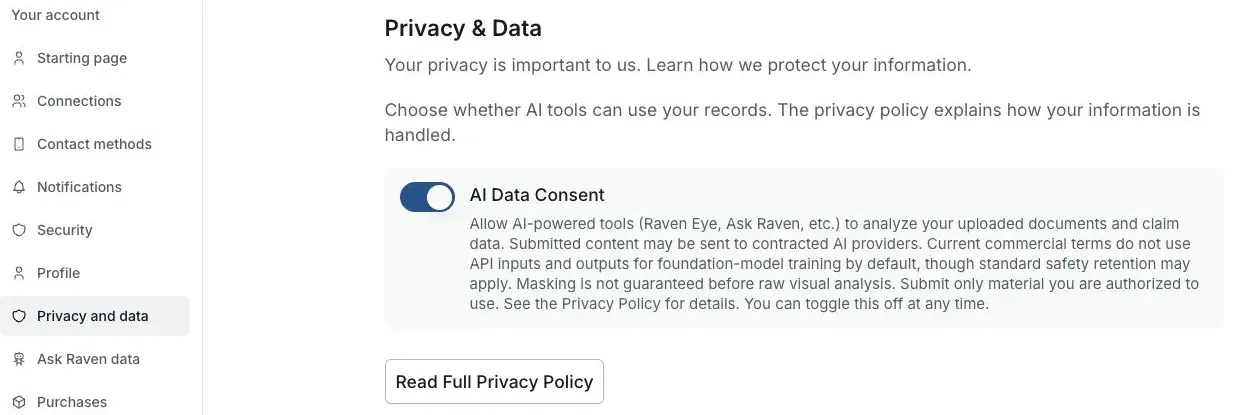
Actual Settings screen from the fictional account preview.
Remove one saved item
Use the delete control in the feature that owns the attachment, conversation, report, analysis, document, or import. Wait for the feature to confirm completion before treating it as removed.
Stop future VA sharing
Disconnect Claim Raven under Connected apps in VA.gov and use the VA connection control in Claim Raven. This stops the active connection but does not delete unrelated account content.
Withdraw future AI consent
Use the AI Data Consent control in Settings. Withdrawing consent affects future consent-dependent processing; it does not itself delete prior conversations, attachments, reports, analyses, or other saved records.
Delete the account and covered data
Follow the verified account-deletion process when you want covered Claim Raven account data removed. Limited legal, tax, fraud-prevention, security, support, dispute, processor, backup, or platform-integrity records may follow separate retention requirements.
What this answer does not promise
It does not promise one physical data region, one storage provider, one encryption method, one automatic purge schedule, immediate deletion from every processor or backup, or that every tool retains or discards its original source in the same way.
Current storage and connection sources
Review the current storage policy
Open the Privacy Policy for the current feature-by-feature storage, retention, provider, and deletion disclosures.
Useful links
- Read what Claim Raven collects and stores
- Review current data-retention rules
- Review current service providers
If this does not work
You deleted one item but other copies remain
- Read the current notice and status for the action you took.
- Keep passwords, verification codes and private records out of ordinary support messages.
Check whether another feature, export or separate saved record contains a copy. Deleting one item does not by itself erase every copy.
Related articles
Was this helpful?
Still need help? Ask the team