Do you offer refunds?
Find the refund rule for your purchase and prepare a request with the payment details support needs.
Written By Landon
Last updated 1 day ago
Recurring subscriptions have a 30-day, no-questions-asked first-payment policy. A Pathfinder membership refunds every membership payment if you ask within 60 days of your first payment. Pathfinder annual offers include a full refund through day 30, followed by refunds for unused access and undelivered outputs. Existing Pathfinder contracts retain their accepted 60-day terms.
Important: Identify the purchase before using a refund rule
This article's 30-day, no-questions-asked rule applies to the first payment for a recurring Claim Raven subscription. Pathfinder has a separate rule described below. Any other purchase is outside this article; use its exact checkout, receipt, current Terms, and product-specific support path.
Current refund boundaries
The purchase type and payment history determine which current rule applies.
Request a Pathfinder refund
Find your subscription controls
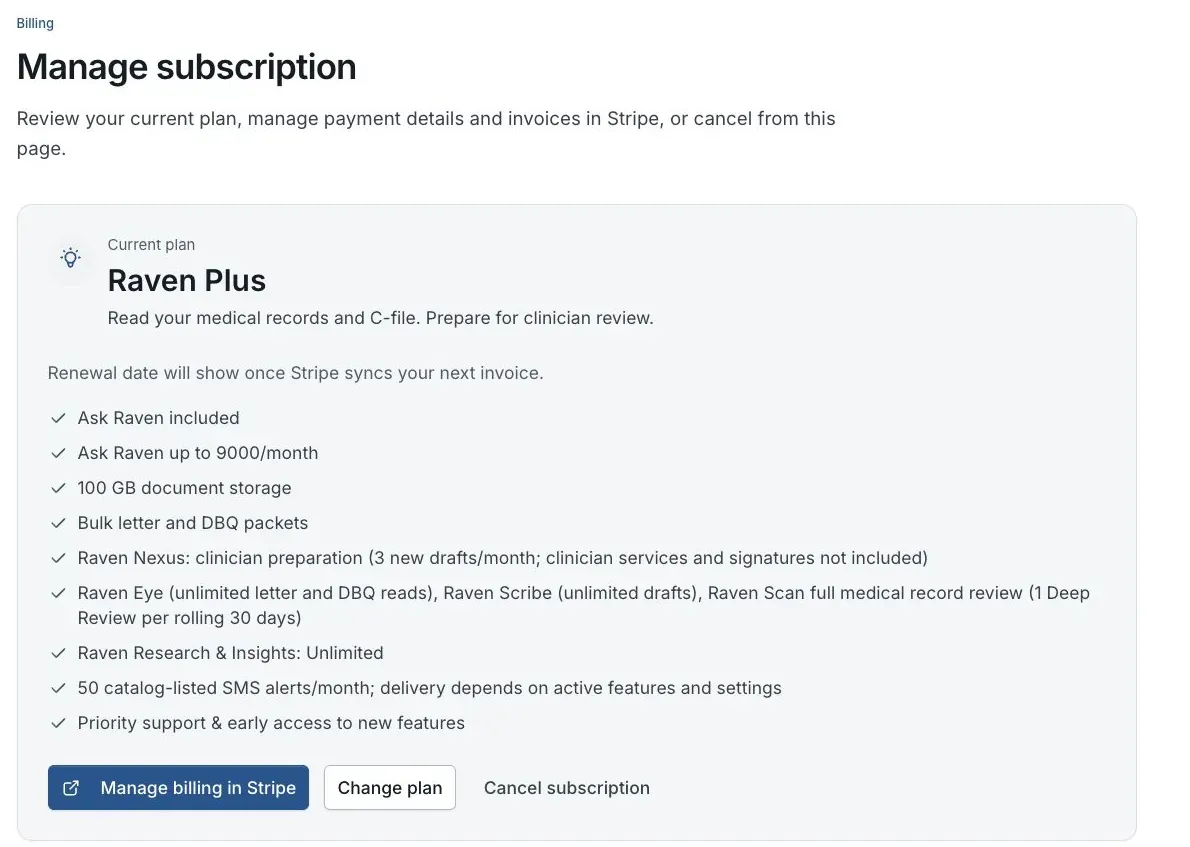
Billing preview for fictional member Jordan Davis. No real subscription is shown.
Email the Pathfinder team
Email guide@claimraven.com from the address on your Claim Raven account and say you want a Pathfinder refund. You do not need to explain why or provide claim records.
We use the received timestamp
The time Claim Raven receives your request controls the calculation. The new annual offer refunds all payments through day 30. Existing contracts retain their accepted 60-day window. Using Cipher or receiving a Strategy Brief does not remove the full-refund guarantee during your applicable window.
After the guarantee, we refund unused value
For the new annual offer, access is $300 prorated by elapsed time over 365 days, rounded to the nearest cent. Add $50 for a successfully delivered Cipher review and $150 for a successfully delivered Strategy Brief; product-defect outputs are excluded. Subtract that value from payments received, with a minimum refund of $0. For example, at day 45 with both outputs delivered, $236.99 is retained regardless of payment method.
Legacy contracts continue to use started UTC calendar months and their accepted contract value after day 60.
Refunds end access and future payments
An exit ends Pathfinder and its included Plus access and cancels remaining installments, even when the cash refund is $0. A separate Plus subscription is unaffected. Export saved outputs from Pathfinder and keep your own records. When money is returned, Stripe sends the refund notice; bank settlement timing can vary.
Caution: A plan-change credit is not a promised cancellation refund
The Terms say unused subscription time may be prorated and credited when you upgrade or change plans. That billing credit is different from a guaranteed cash refund after cancellation. The current Terms do not promise a prorated annual refund after the first-payment window.
Request review of a recurring subscription payment
Confirm the charge is for a recurring subscription
Check Billing, the Stripe receipt, or the invoice for the product, charge date, amount, and whether it is the first subscription payment or a renewal. Do not assume that a Pathfinder installment or one-time purchase follows the subscription rule.
Email the documented subscription address
Send the request to help@claimraven.com from the email address on the Claim Raven account. State that you are requesting review of a subscription refund and include the plan name, charge date, amount, and non-sensitive invoice or receipt identifier if available.
Keep sensitive information out of email
Do not send a full card or bank-account number, security code, password, multifactor code, Social Security number, VA file number, medical record, or claim evidence. Stripe processes payment-card details; Claim Raven does not need those details to identify the request.
Cancel separately if you also want renewal to stop
A refund request does not by itself confirm that future renewals stopped. Use Billing or the Stripe portal cancellation option available to the account, finish its confirmation, and save the subscription end date.
Save the request and the decision
Keep the sent email, invoice or receipt identifier, support response, and any Stripe refund notice. A request is not the same as an approved or completed refund, and the current Terms do not guarantee a processing time.
Refund, cancellation, access, and deletion are separate
- Canceling stops future renewal after the current paid period when successful; it does not automatically ask for or issue a refund.
- Requesting a refund does not by itself prove that the subscription was canceled. Complete cancellation separately if you do not want another renewal.
- Paid access normally continues through the paid period after cancellation, but a refund, chargeback, fraud response, or legal requirement can end access earlier under the current Terms.
- A refund or cancellation does not automatically delete the Claim Raven account, saved records, analysis history, or transaction records. Account deletion follows a separate process.
- A subscription refund does not disconnect VA.gov access or change an ID.me, Login.gov, or VA.gov account.
If this does not work
You cannot tell whether the charge was a subscription, Pathfinder, or a one-time purchase
- Compare the product name and date on Billing, the checkout confirmation, receipt, and invoice.
- Look for the exact refund disclosure shown with that product instead of relying on a general Help Center summary.
Email the support address shown on the receipt with the non-sensitive invoice or order identifier and ask which written policy applies. Do not send full payment-card details or veteran records.
The charge is a renewal or the first-payment window has passed
- Confirm the original purchase date and whether the charge is a later renewal.
- Review the current Terms and retain any renewal or price-change notice that applies.
You may request case-by-case review, but do not treat the outcome or a prorated amount as guaranteed. Separately cancel before the next renewal if you want future charges to stop.
Support approved a refund but you do not see the completed result
- Review the support response and any Stripe notice for the current status or reference identifier.
- Check the payment provider associated with the original charge without sending its credentials to Claim Raven.
Reply to the existing support thread with the non-sensitive refund reference and status shown. The Help Center does not promise a fixed settlement time or payment route.
Your payment was for another product or service
- Save the exact checkout disclosure, receipt, and confirmation email for that purchase.
- Use the current Terms and the product-specific support path shown with the purchase.
This article does not define the refund policy for that purchase. Ask the product-specific support path for a documented decision and do not substitute the recurring-subscription or Pathfinder rule.
For a recurring subscription, email help@claimraven.com. For Pathfinder, email guide@claimraven.com. For another one-time purchase, use the support address on its receipt or checkout confirmation.
Request subscription refund review
Use the email address on your Claim Raven account and include only the plan, charge date, amount, and a non-sensitive invoice or receipt identifier.
Useful links
- Review the current subscription and Pathfinder Terms
- Review transaction-data handling
- Contact Claim Raven support
Related articles
Was this helpful?
Still need help? Ask the team