How do I cancel my subscription?
Stop your recurring subscription in Billing and save the confirmation showing when paid access ends.
Written By Landon
Last updated 1 day ago
Sign in to Claim Raven and open Billing. The documented Claim Raven flow begins with Cancel subscription; the current Terms also permit cancellation through the Stripe customer portal when that account's portal presents a cancellation option. Finish the confirmation in the route you choose and save the end date. The Claim Raven flow may show optional ways to keep or change the plan, and asks for an optional reason and optional feedback, before the final confirmation.
A successful cancellation schedules the subscription to end after the current paid period; it does not immediately remove paid access, delete the account or saved data, disconnect VA access, or automatically request a refund.
Important: Start on Billing and finish one cancellation route
Use Cancel subscription for the documented Claim Raven flow. You may instead choose Manage billing in Stripe and, if that account's portal displays a cancellation option, follow Stripe's confirmation. Stripe also handles payment methods, invoices, receipts, renewal history, and other options available to the account. Simply opening or closing either flow does not cancel the plan.
Cancel the recurring paid plan
Find your subscription controls
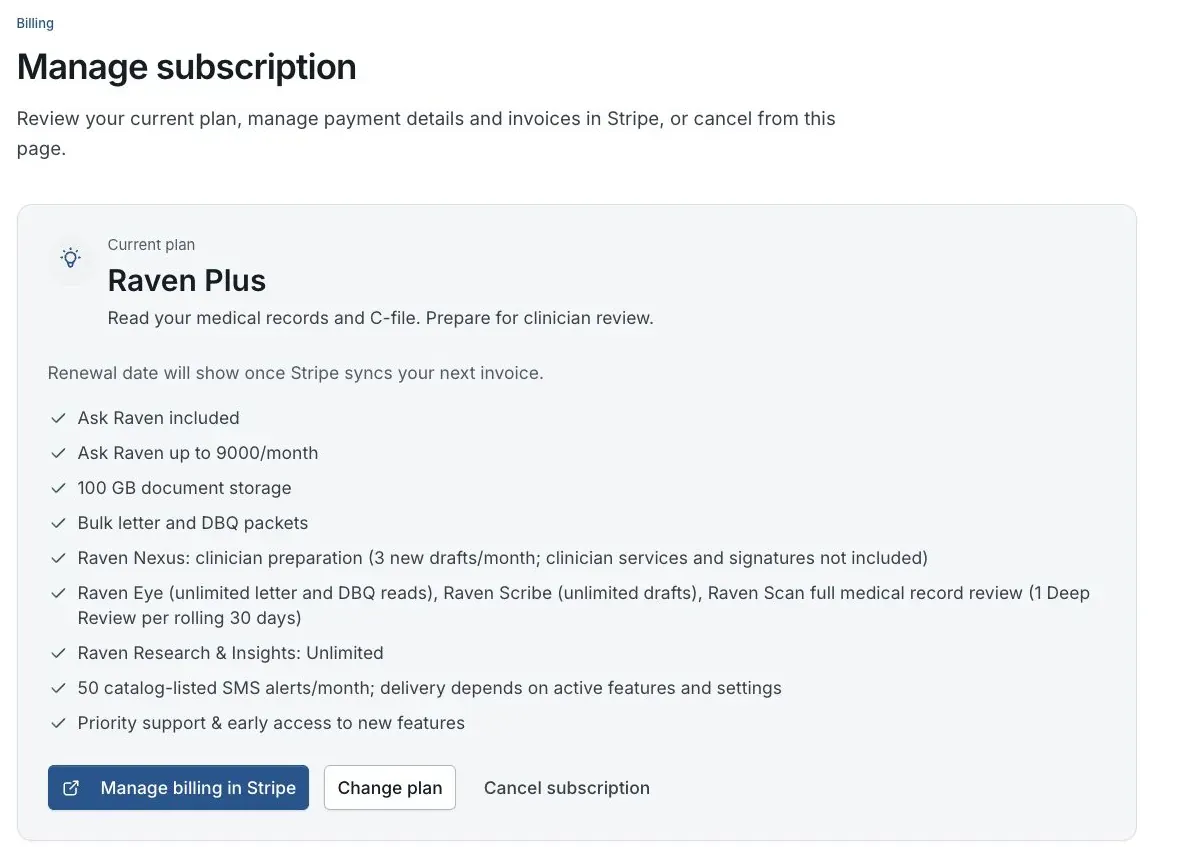
Billing preview for fictional member Jordan Davis. No real subscription is shown.
Sign in and open Billing
Open Claim Raven Billing from the account that owns the recurring subscription. Billing is a private account page, so a signed-out visitor is asked to sign in.
Check that the paid subscription appears
The Cancel subscription button appears for an eligible paid Stripe subscription. Free accounts and Founding lifetime access have no recurring Claim Raven subscription to cancel. If a paid plan appears without the button, use the troubleshooting section below.
Choose an available cancellation route
Use Cancel subscription to open the documented Claim Raven flow. The Terms also allow cancellation through the Stripe customer portal, so you may use Manage billing in Stripe when that portal displays its own cancellation option. Portal options can vary by account or configuration; opening the portal alone does not cancel anything.
Complete the steps shown by that route
In the Claim Raven flow, an eligible account may first be shown a lower-priced storage-only plan, and may be shown a limited discount after the reason step. Accepting one keeps a subscription active. Choose Continue cancellation if you do not want the offer; some accounts go directly to the reason step. If you use a cancellation option in Stripe, review and finish Stripe's own confirmation instead.
Confirm the cancellation
In the Claim Raven flow, choosing a cancellation reason is optional and the step can be skipped. The written feedback step that follows is also optional. Do not place claim facts, medical details, Social Security numbers, VA file numbers, passwords, or access codes in the feedback. Nothing is scheduled until you choose Cancel my paid plan on the final confirmation step. In Stripe, use only the confirmation requested by the portal.
Read and save the result
The success screen shows the end date when Stripe returns one; otherwise it says the plan will end at the close of the current billing period. Save that result and compare it with the renewal date on Billing. If the success screen does not appear, do not assume the cancellation finished.
Paid access normally continues through the current period
The checked cancellation route schedules the subscription not to renew at the end of its current paid period. The account normally keeps its paid tier until then and moves to Free after Stripe reports that the subscription ended. A refund, chargeback, fraud response, payment failure, or legal requirement can follow a different access timeline under the current Terms.
What each choice does
Cancellation, save offers, refunds, and deletion are separate actions.
Cancellation, refunds, and account data
- Refunds are separate. Canceling does not automatically ask for or issue a refund. The current Terms say the first subscription payment is eligible for a full, no-questions-asked refund when requested within 30 days of purchase by emailing help@claimraven.com; later renewals and requests outside that window are reviewed case by case. Check the current Terms and any nonwaivable rights that apply before relying on a refund outcome.
- Account and saved data remain. When the recurring subscription ends, the Claim Raven account normally moves to Free. Use the separate account-deletion process if you want covered account data removed.
- VA access remains separate. Canceling a Claim Raven subscription does not disconnect a VA.gov connection or change an ID.me, Login.gov, or VA.gov account.
- Pathfinder and one-time purchases are separate. This article covers a recurring Claim Raven subscription. Pathfinder access, installment terms, included C-File analysis, and one-time purchases follow their own checkout and Terms disclosures.
If this does not work
The Cancel subscription button is missing
- Confirm you are signed in to the account that owns the paid subscription.
- Check whether Billing shows Free or Founding lifetime access, which has no recurring subscription to cancel.
- Check whether Billing is still waiting for Stripe subscription information to load.
Reload Billing once. If the paid plan still appears without the Claim Raven cancellation control, open Manage billing in Stripe and check whether that portal offers the Terms-permitted cancellation option. If neither route is available, contact Claim Raven support from the account email and include the plan name and a description of the missing controls. Do not email card numbers, passwords, medical records, or VA identifiers.
The dialog reports an error or never shows success
- Keep the page open until any pending request finishes.
- Confirm the internet connection is stable, then reload Billing and try once more.
- Check whether Billing still shows an upcoming renewal date.
If no successful cancellation result appears, contact support before the renewal date and keep the time, error message, and non-sensitive screenshot if one is available. Do not assume that closing the dialog or seeing an error stopped renewal.
You canceled but need a refund or data deletion
- Review the subscription-and-payment section of the current Terms for refund eligibility.
- Review the separate account-deletion article before requesting permanent deletion.
Send the separate refund or deletion request through the documented support process. A subscription cancellation alone does neither.
Use the Claim Raven contact page or email help@claimraven.com from the address on the account.
Open your Billing page
Sign in to the account that owns the paid subscription, check the renewal information, and use the separate Cancel subscription control.
Useful links
Related articles
Was this helpful?
Still need help? Ask the team