Do AI vendors keep my data?
Check how AI processing and retention differ from the records you save or delete in Claim Raven.
Written By Landon
Last updated 1 day ago
Claim Raven sends the text, files, images, and account context an AI feature needs to commercial AI providers that work for it under contract. Under their current terms for paid business use, those providers do not train their models on that content by default. A provider may keep content for a limited time to monitor for abuse, generally no more than 55 days, and longer if it is flagged for a safety review or must be kept for legal reasons.
Claim Raven masks common identifiers in text you type on supported features, but text read from your files, and images and scanned pages, can reach a provider without masking. Claim Raven does not share account data with advertising vendors or data brokers.
Important: Limited retention is not a deletion promise
Provider terms differ by provider, service, account setting, safety rule, and legal obligation. Abuse-monitoring retention is generally no more than 55 days, and content flagged for a policy violation can be kept longer. Claim Raven does not promise that every request has zero data retention.
What Claim Raven sends
- Requested content: An AI feature may send the prompt, relevant chat context, extracted text, a file, image, screenshot, or scanned PDF page needed to perform the task you requested.
- Account context when authorized: Consent-dependent features may include relevant VA profile or claim context when AI Data Consent is enabled. The active Ask Raven conversation still needs its own messages and files to work even when cross-conversation or VA-profile personalization is off.
- Which provider: Claim Raven uses more than one commercial AI provider. Which one handles a request depends on the feature and can change over time, and another provider can take over when the first one fails.
What the provider terms do and do not mean
- Training: Under their current terms for paid business use, the AI providers Claim Raven uses do not train their models on the content Claim Raven sends by default. These are commercial terms, not a promise that provider terms can never change.
- Safety and abuse monitoring: A provider may keep content for a limited time to detect abuse, generally no more than 55 days. Flagged content can be kept longer, and authorized provider staff may review it. A provider may also keep content longer to meet a legal obligation.
- Request settings: A setting that asks a provider not to store a request is not proof that every provider copy or safety log is deleted immediately.
- Claim Raven use: Claim Raven does not use VA data, claim information, uploaded records, or AI content for advertising, marketing profiles, or sale. Contracted providers receive only the content needed for the requested service and remain subject to their applicable terms and Claim Raven instructions.
Masking has important limits
Claim Raven applies best-effort masking to common direct identifiers, such as Social Security numbers, VA file numbers, phone numbers, email addresses, street addresses, and labeled names, in text you type on supported features. Masking does not cover everything. Text read from files you upload, and the background summary of a long Ask Raven chat, can be sent without masking.
Claim Raven also cannot reliably remove identifiers from an image or scanned page before an AI provider reads it, so a raw image, screenshot, or scanned page may reach the provider unredacted. Masking is not guaranteed to catch every identifier or medical detail.
Use the control that matches your goal
Find the consent control
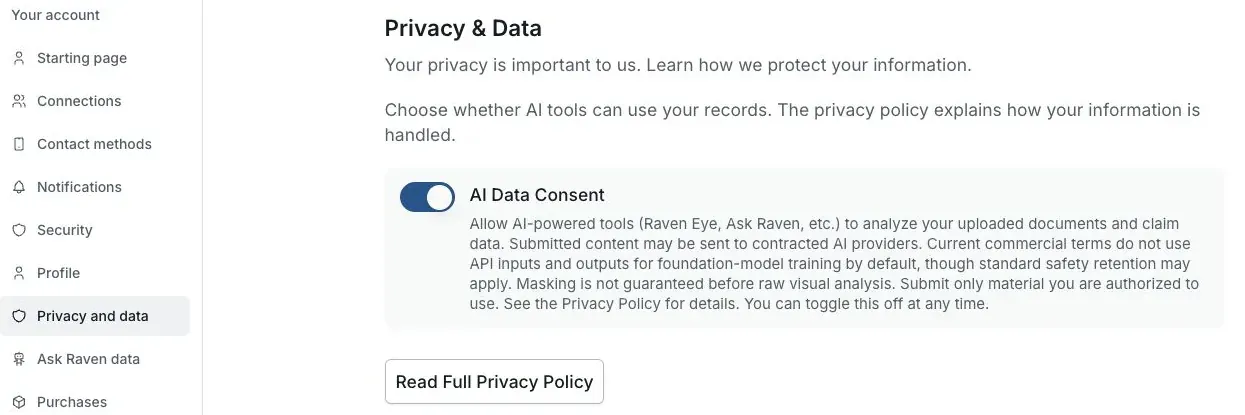
Actual Settings screen from the fictional account preview.
Share only what the task needs
Remove unrelated pages and redact unnecessary identifiers before uploading when doing so will not undermine the task. Do not submit another person's records unless you have permission or other legal authority.
Control future consent-dependent AI use
Use AI Data Consent in Settings. Turning it off affects future consent-dependent access to VA profile, claim, cross-conversation, and cross-tool context; it does not erase the active chat's own messages or files and does not undo prior lawful processing.
Delete a saved Claim Raven artifact
Use the feature's control to remove a conversation, attachment, report, analysis, or other saved item. Deleting a Claim Raven record does not prove that a provider's safety log, legal hold, or backup copy was deleted at the same moment.
Request broader deletion
Use the verified account-deletion or consumer-health-data request process when appropriate. Claim Raven will notify relevant processors of a valid covered request, while provider and backup deletion can take longer where their terms or law permit.
Check the current policy before sensitive use
Providers, retention programs, and contractual controls can change. Review the current Privacy Policy and the notice shown by the feature before sending material you consider especially sensitive.
Current privacy sources
Review the Privacy Policy
Open the Privacy Policy for the provider categories, consent rules, and retention limits.
Useful links
If this does not work
You turned off consent but an old result is still saved
- Read the current notice and status for the action you took.
- Keep passwords, verification codes and private records out of ordinary support messages.
Consent controls future processing. Use the feature’s removal control or the verified deletion process for saved records.
Related articles
Was this helpful?
Still need help? Ask the team