Is my information secure?
Review the safeguards and limits, then choose the control that fits what you want to protect or remove.
Written By Landon
Last updated 1 day ago
Claim Raven uses practical, layered security controls, but no online service can guarantee absolute security. You decide whether to connect VA data or provide records, and the current Security page and Privacy Policy explain what each feature collects, stores, sends to providers, and lets you remove.
Security depends on the connection and feature
A read-only VA connection, a VA Data Bridge import, an Ask Raven attachment, and a saved analysis do not have the same data flow or retention rule. Review the permission screen and the notice shown by the feature before you continue.
Security layers used today
Claim Raven uses different controls at different points. Each control has a boundary that matters.
Source retention varies by tool
Check the current feature notice and Privacy Policy before providing sensitive material. This overview does not replace those specific disclosures.
Never send account secrets through support
Do not send passwords, multifactor codes, recovery codes, Social Security numbers, VA file numbers, banking details, identity documents, or complete medical and claim records through an ordinary support email, contact form, or screenshot. Use a redacted example with only the technical details needed to show the problem.
Controls you can use
Find the consent control
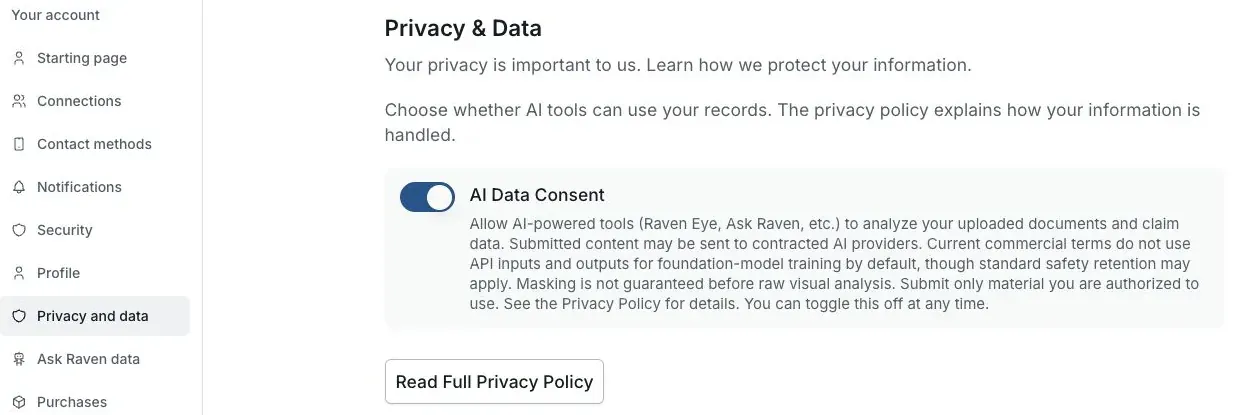
Actual Settings screen from the fictional account preview.
Review the VA authorization screen
VA says a connected app can access only the information and permissions listed when you authorize it. Do not approve the connection if the list is broader than you expect.
Expected result: You understand the current permission request before any VA data is shared.
Provide only what the feature needs
Remove unnecessary identifiers before uploading when that will not prevent the feature from doing its job. Avoid putting credentials, unrelated records, or another person's information into a request.
Expected result: The feature receives the minimum useful information for the task you chose.
Use feature-level removal controls
Remove Ask Raven attachments or conversations and delete saved analyses or reports you no longer need. Check that the control confirms completion before treating the content as removed.
Expected result: Unneeded saved content is removed through the route that owns it.
Control future AI processing
AI features require consent. Use the available Settings control when you want to withdraw consent for future AI processing, and separately remove any saved attachments, conversations, reports, or analyses you no longer need.
Expected result: Future AI processing and previously saved artifacts are handled as separate choices.
Treat VA disconnect and account deletion separately
Disconnect through VA.gov when you want to stop new VA information from reaching Claim Raven. Follow the verified account-deletion process when you also want covered Claim Raven account data deleted.
Expected result: You apply the control that matches your intent instead of assuming one action does both.
What this answer does not promise
- It does not promise that a breach, device compromise, provider incident, configuration error, or other security failure can never happen.
- It does not mean every item is encrypted by the same method or retained for the same period.
- It does not mean a read-only VA connection covers a file, chat, answer, or import you separately choose to provide.
- It does not mean disconnecting VA access deletes information already stored in Claim Raven.
- It does not mean Claim Raven is a VA service, is endorsed by VA, or represents you before VA.
Current privacy and security sources
Review current security details
Open the Security page for the current VA authentication, AI processing, retention, infrastructure, and user-control overview.
Useful links
If this does not work
You cannot tell whether removal completed
- Read the current notice and status for the action you took.
- Keep passwords, verification codes and private records out of ordinary support messages.
Check the feature’s confirmation and reload its saved list. If the result is unclear, contact support with the page and non-sensitive error text.
Related articles
Was this helpful?
Still need help? Ask the team