Review records in Pathfinder
Check the processing status of your Pathfinder records and compare observations with the original files.
Written By Landon
Last updated 1 day ago
Compare an observation with its source
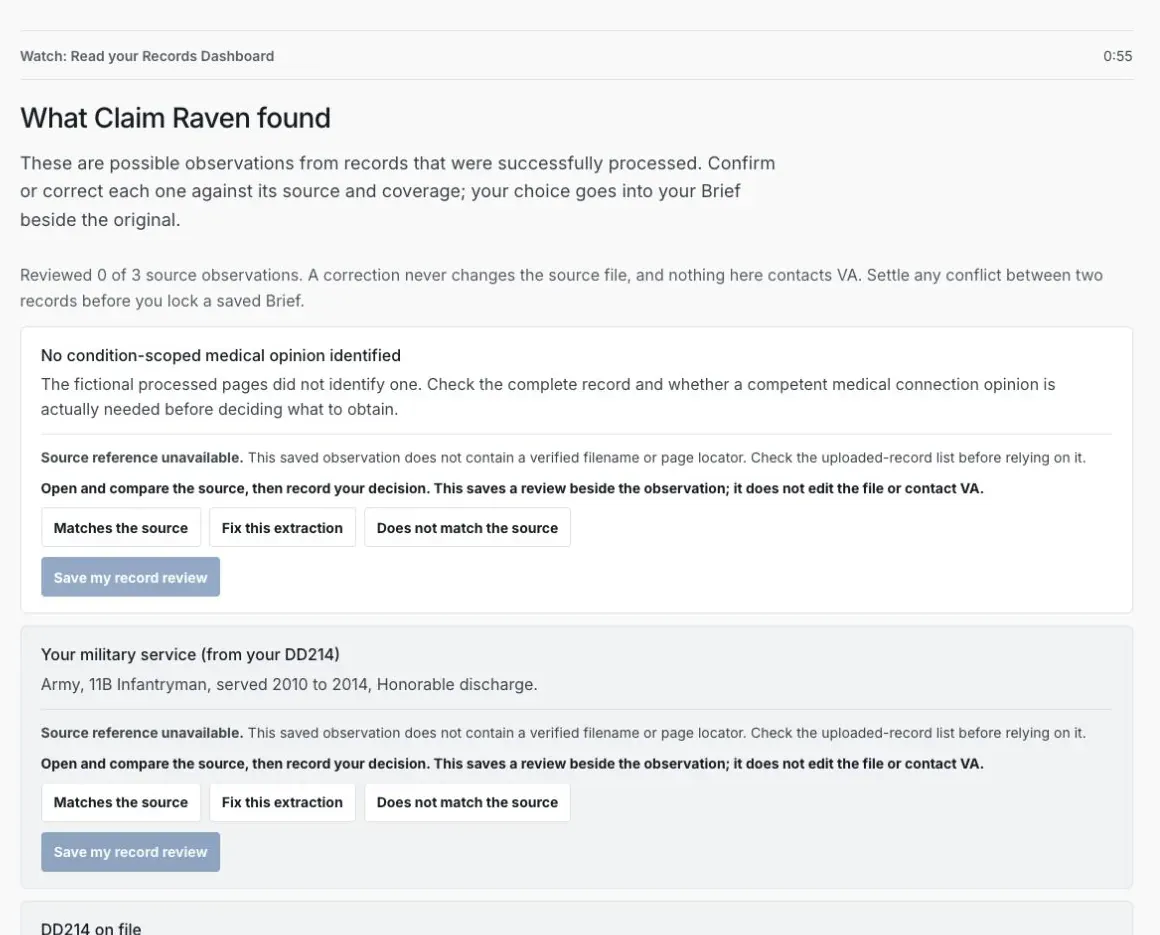
Pathfinder development preview with fictional records.
The Records Dashboard is a view of the files in your Pathfinder records. It shows product processing state and possible observations from content that processed successfully. It does not show every record held by VA, replace your private source archive, or prove that a document was sent to or accepted by VA.
Canonical Pathfinder record states
Ready is a processing state, not a claim conclusion
Ready does not mean complete, accurate, relevant, persuasive, legally sufficient, filed, or accepted by VA. Compare every displayed item with the complete source and any controlling notice.
Review one record at a time
Match the filename to your source
Confirm that the record belongs to you and belongs in your Pathfinder records. If identity details conflict or cannot be matched safely, do not approve it until you resolve the question.
Expected result: Pathfinder holds only records you recognize.
Read the processing and coverage state
Treat analyzing, partial, failed, and no-readable-text states as limits. A later screen should not silently turn them into complete evidence.
Expected result: Unfinished or limited processing stays visible.
Verify the document type
Compare the displayed type with the actual file. Confirm or correct it when Pathfinder asks for your review.
Expected result: Later tools do not rely on an unreviewed classification.
Compare observations with exact pages
Possible observations may be incomplete or mistaken. Use the source file and available page or extraction coverage to verify each statement.
Expected result: A generated observation remains secondary to the source.
Keep Claims History separate
Claims History records your working profile choices about prior claims, ratings, relationships, and possible review paths. It is not a second document-processing dashboard and does not turn a relationship into a medical connection or lane decision.
Expected result: Document state and veteran-entered claim history are not conflated.
If this does not work
The record still says Analyzing
- Refresh the signed-in Pathfinder page after a reasonable interval
- Check whether the upload list shows a visible failure or identity prompt
- Keep the original and do not upload repeated duplicates just to change the state
If the state does not advance, contact product support with a synthetic filename pattern, approximate size, file type, and displayed state. Do not attach the private record to an ordinary support message.
The record is Partially ready
- Read the exact page or text-coverage message
- Compare the retained coverage with the complete source
- Use the offered specialist tool or split-file action only when it fits the record
Keep the partial limit visible and do not describe the quick review as a complete record analysis.
Return to your saved Pathfinder step
Open Pathfinder and resume the protected step saved for your account.
Related articles
Was this helpful?
Still need help? Ask the team