What happens to my DD214 when I upload it?
Review the original, extracted text and facts kept after a career-document upload.
Written By Landon
Last updated 1 day ago
The current Resume Raven evidence vault can retain the original file, extracted text, and facts. Each has its own available deletion path. Review extracted facts carefully and never assume closing the browser deletes saved evidence.
Career drafts must stay accurate and user controlled
Resume Raven does not verify employment, guarantee interviews or jobs, apply to an employer, or send a resume. Document extraction and AI drafts may be wrong and require review.
Follow these steps
Find the starting point
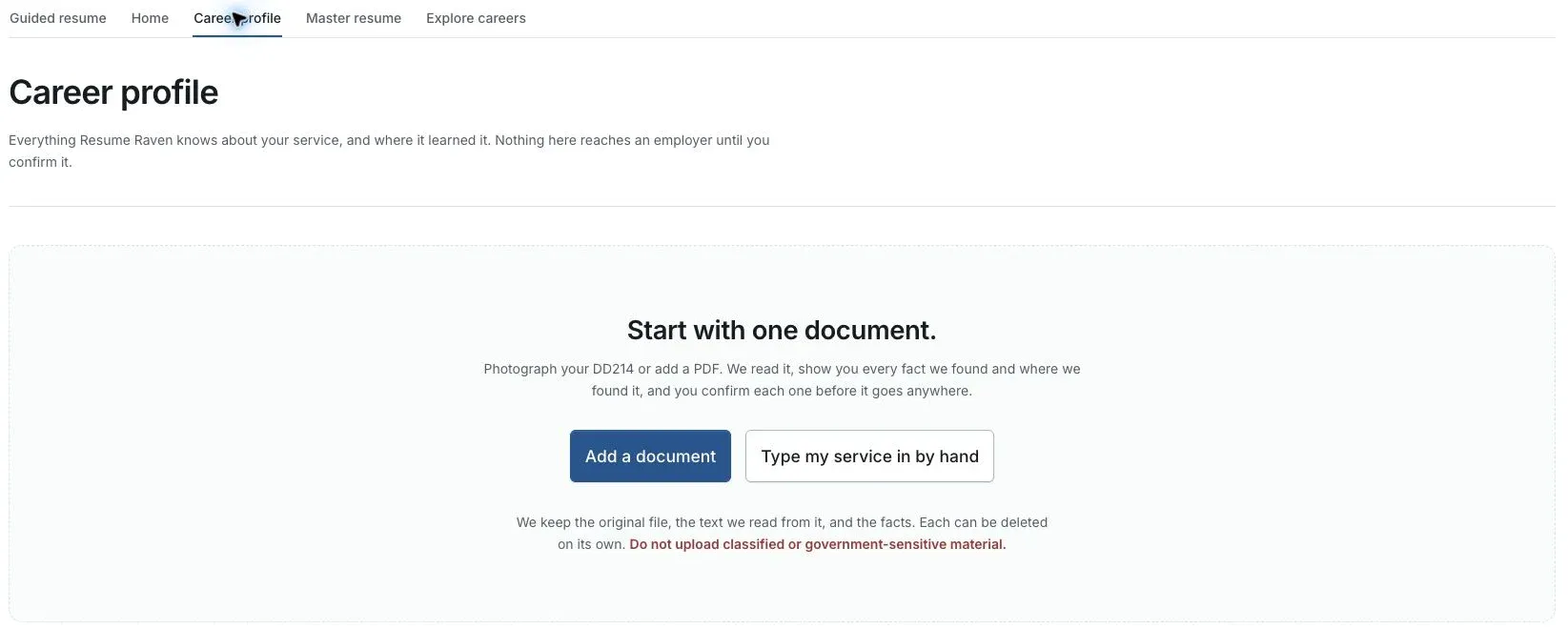
Actual Resume Raven screen in the fictional account preview; no personal records uploaded.
Open Career profile
Find the document you added and the extracted information associated with it.
Compare with the original
Check service dates, duties and qualifications. Correct extraction errors before confirming facts.
Choose what to keep
The original file, extracted text and facts have separate removal paths. Read the specific control before using it.
Verify removal separately
Check the remaining saved items. Closing the browser does not delete the evidence vault.
If this does not work
The saved facts or draft do not match your experience
- Compare the wording with the original document or your own confirmed history.
- Check the account and selected job or resume.
- Keep unsupported suggestions out of the final version.
Preserve your accurate original. If a save or extraction fails, keep the page open and report the visible error without attaching private service records.
Return to Resume Raven
Review your facts and the intended job before continuing.
Useful links
Related articles
Was this helpful?
Still need help? Ask the team