Why am I being asked to consent to AI processing?
Review the AI processing notice and choose whether to enable the tools that depend on your consent.
Written By Landon
Last updated 1 day ago
Claim and document content can include medical, service, identity, and other sensitive information. Claim Raven requests a separate choice before covered account tools send that content through AI processing. General account terms and a VA connection are not treated as the same choice.
Read the current notice before opting in
The notice explains that submitted content may be sent to contracted AI providers, provider safety retention may apply, and masking is best effort on supported text paths. Raw visual analysis can occur before masking. Submit only material you are authorized to use.
What your choice controls
AI consent is separate from other account actions
Make an informed choice
Find the consent setting
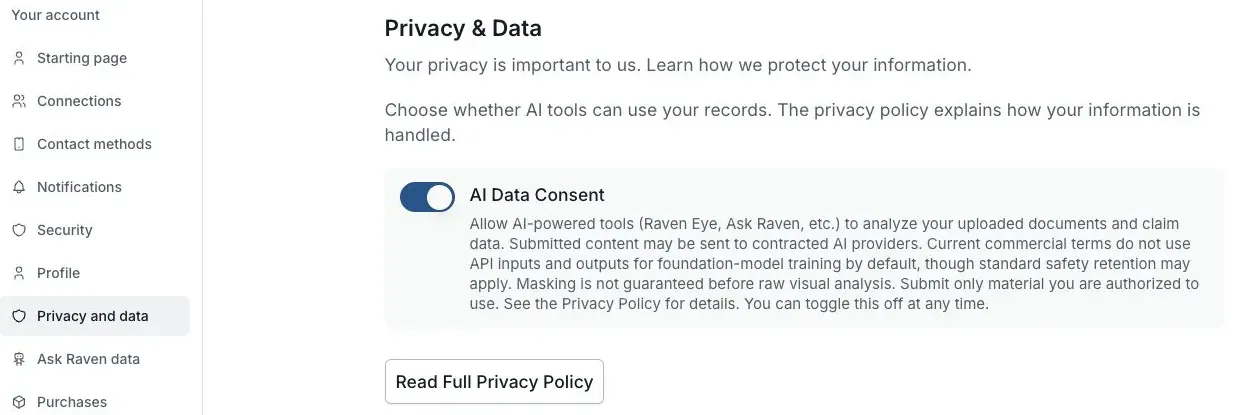
Actual Settings screen from the fictional account preview.
Identify the tool and material
Know which AI tool you are opening and what text, image, or document it may process.
Expected result: Your decision is tied to a specific intended use.
Read the notice and Privacy Policy
Review provider processing, masking limits, tool-specific storage, retention, and available deletion controls. Do not assume every tool handles source files and outputs the same way.
Expected result: You understand the stated handling before submission.
Submit the minimum necessary
Remove unrelated pages and unnecessary identifiers when that is safe and does not change the document you intend to analyze. Never enter credentials, passwords, or multifactor codes.
Expected result: AI processing receives no more sensitive material than the task requires.
Choose enable or leave disabled
Opt in only if you understand and accept the current notice. Leaving consent disabled prevents use of covered tools but does not prevent ordinary non-AI account use.
Expected result: The choice remains yours.
Review and delete separately
Check every AI output for accuracy. Use the applicable tool's deletion control or account-deletion process when you want stored information removed.
Expected result: Consent, accuracy review, and deletion remain separate controls.
Revocation is prospective
Turning AI consent off controls future consent-dependent processing. It does not automatically delete saved conversations, attachments, drafts, analyses, or account data, cancel a subscription, or disconnect a VA connection.
If this does not work
An AI tool remains disabled after you opted in
- Confirm the Settings control shows consent enabled
- Reload the tool once
- Confirm you are signed in to the intended account
- Check the tool's separate access or plan requirement
Do not resubmit sensitive material repeatedly. Contact support with the tool name and visible error.
You want to stop future AI processing
- Open Settings
- Turn AI data consent off
- Confirm the saved preference
- Review tool-specific deletion controls separately
Future consent-dependent processing stays blocked until you opt in again; use separate controls for stored information.
Email help@claimraven.com with the tool name and a synthetic description. Do not attach the sensitive source material to a general support request.
Review your AI consent preference
Open Settings to see the current account choice. Changing it does not delete saved data or disconnect VA.
Useful links
Related articles
Was this helpful?
Still need help? Ask the team