Why can't I see my claims after logging in?
Check the source and connection when a claim is missing from your Claim Raven account.
Written By Landon
Last updated 1 day ago
Signing in to Claim Raven does not by itself connect your VA.gov data or confirm that all of your VA claims are available here. Check VA.gov's claim-status tool directly for VA's current view of an eligible claim, decision review, or appeal. Claim Raven's checked connection code is configured for VA sandbox and demo use, and a VA Data Bridge import is only a snapshot you chose to import.
When a live, authorized connection is available, Claim Raven can show only the claim information VA returns for the permissions you approved. If VA.gov does not show an expected claim or you cannot sign in, use VA's official support options; do not send Claim Raven passwords, multifactor codes, claim records, identifiers, or unredacted screenshots.
Missing in Claim Raven does not mean missing at VA
Do not refile a claim, choose a review option, ignore a notice, or miss a deadline because a Claim Raven card is absent. An empty view can reflect filters, a completed claim, demo suppression, partial authorization, a failed or unavailable API response, or an old or empty VA Data Bridge snapshot. Use VA.gov, your filing receipt, and the current VA notice to confirm the official record and required action.
Start with VA.gov
Check the current claims view
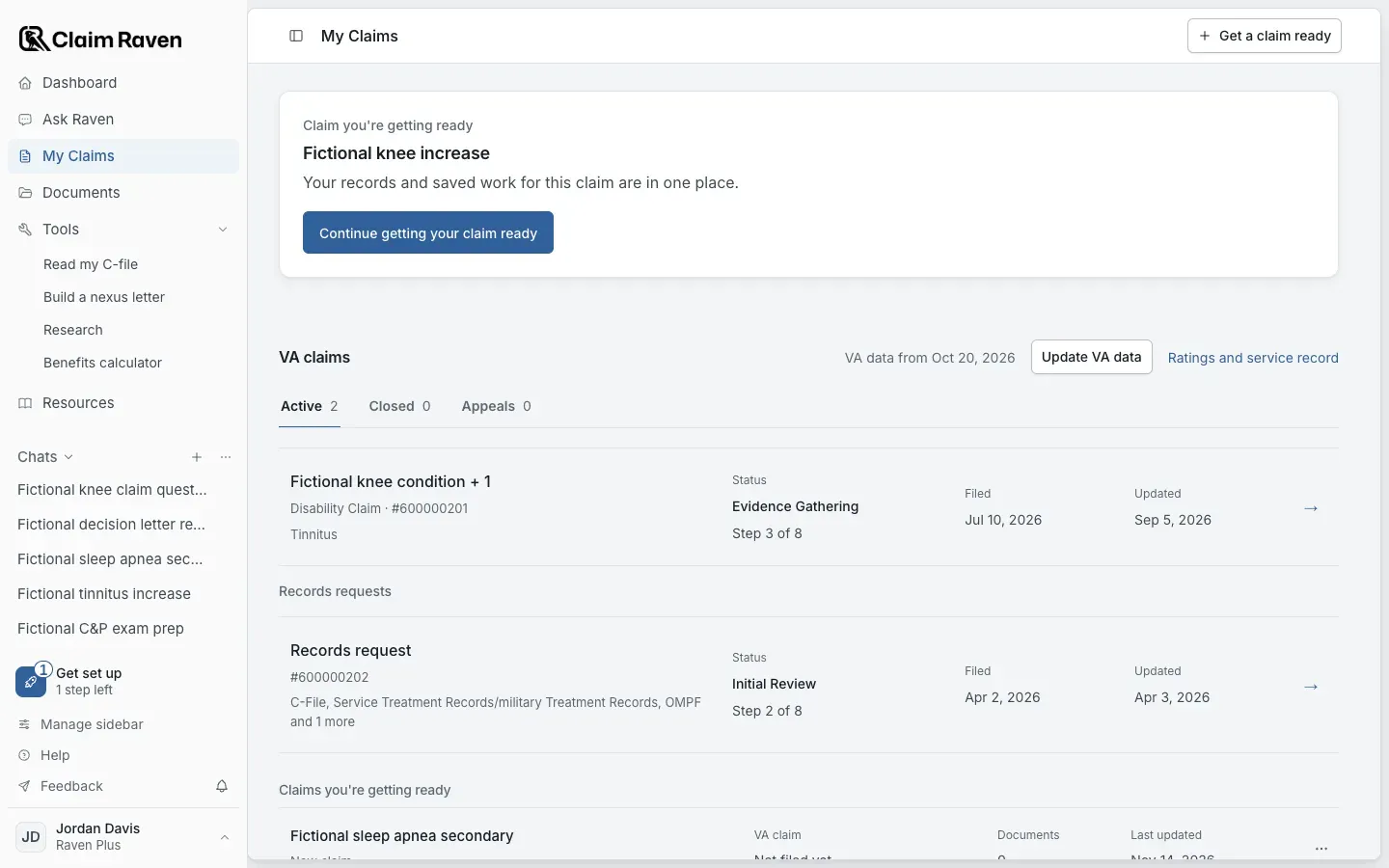
Actual app screen with fictional preview data.
Open the official claim-status tool
Go directly to VA.gov's claim, decision-review, and appeal status page. Sign in there with Login.gov or ID.me. Claim Raven account credentials do not sign you in to VA.gov.
Review every relevant list
VA's tool separates claims, decision reviews, and appeals and supports only listed benefit and request types. Open the item to review its details instead of relying only on the first summary screen.
Keep the filing evidence
For an online disability claim, VA says the on-screen submission message confirms receipt. For mailed work, preserve the mailing proof and VA acknowledgment. An empty third-party dashboard is not a substitute for that evidence.
Use VA support for a VA.gov mismatch
If the official tool does not show an expected eligible item, you cannot sign in, or VA information appears wrong, use the phone or support route on the current VA page. Claim Raven cannot add or correct a VA record.
Identify what Claim Raven is showing
- Filtered view: on My Claims, clear the search box, then check the Active, Closed and Appeals tabs under VA claims. A message that says no claims match the current filters does not mean the account has no claims.
- Demo or sandbox: Claim Raven intentionally suppresses placeholder claims in demo mode so sample records are not treated as your personal record. Never enter real Login.gov or ID.me credentials into a screen identified as sandbox or demo.
- Partial VA authorization: the account can be connected for veteran verification while claims access still needs authorization, or claims can be connected while another data group remains incomplete. Read the connection card in Settings > Connections instead of assuming every group is active.
- Live claims response: when a live connection and claims permission are available, Claim Raven can show only what the authorized VA Claims API returns. A connection label does not guarantee that every VA record type or claim will be present.
- VA Data Bridge: My Claims can show claims from the latest snapshot you intentionally imported. That snapshot is not a live feed and does not update until you run and upload a new import.
- Decision review or appeal: Claim Raven and VA may display these separately from disability claims, and third-party appeals availability can be limited. Check the official VA list even when the Claim Raven claims section is empty.
If VA.gov shows the claim but Claim Raven does not
Read the environment and connection status
Stop if the card or page identifies a sandbox or demo environment. In an approved live release, confirm whether claims access is complete, partial, disconnected, or asking you to reconnect.
Clear the My Claims view
Remove the search term. Check the Active, Closed and Appeals tabs under VA claims before treating the item as absent.
Request one fresh claims response
When the live claims connection is available, select Refresh once, beside VA claims on My Claims. It requests a fresh claims response instead of relying on the short server cache. Repeated clicks do not create missing permissions or production access.
Update a Bridge snapshot separately
If the account uses VA Data Bridge, select Update VA data beside VA claims on My Claims, then create and upload a new snapshot from your own signed-in VA.gov session. Read the import coverage result. A file that contains no claims, ratings, or appeals gives My Claims nothing new to display.
Compare the source and capture a support-safe report
Note whether VA.gov shows the item, the Claim Raven connection label, data source, approximate attempt time, browser, and visible error text. Do not attach the claim, decision, identifiers, credentials, multifactor code, token, or an unredacted screenshot to ordinary support.
There is no verified universal 24-to-48-hour promise
VA says online disability filing provides an on-screen receipt and that the official claim-status tool shows supported items, but the current guidance does not promise that every new claim will appear in Claim Raven within a fixed window. Check the official status and receipt rather than waiting on an unsupported timer.
What an empty Claim Raven view does not prove
- It does not prove VA failed to receive the claim.
- It does not prove VA denied, closed, or lost the claim.
- It does not prove the claim must be filed again.
- It does not prove a deadline stopped running or a VA request can be ignored.
- It does not prove the account has no decision review, appeal, completed claim, or unsupported benefit type.
- It does not authorize Claim Raven support to request your VA.gov, Login.gov, or ID.me credentials or complete claim records.
If this does not work
An expected claim is still missing.
- Check the official VA.gov record first.
- Check the data source and connection label shown in Claim Raven.
Use the official record, and report only the page, time and non-sensitive error details for product help.
Current VA status and sign-in sources
- VA: Check your claim, decision review, or appeal status
- VA: Claim status tool FAQs
- VA: The claim process after you file
- VA: Connected apps FAQs
- VA: Signing in to VA.gov
Check the official VA status first
Open VA.gov directly to review the current claim, decision-review, or appeal record before troubleshooting a third-party display.
Useful links
Related articles
Was this helpful?
Still need help? Ask the team