My Data
Choose the right control for saved records, consent, VA access or account deletion.
Written By Landon
Last updated 1 day ago
My Data controls should be read from the current authenticated product and Privacy Policy. Export, connection, consent, saved-output deletion, and account deletion are separate actions; one does not automatically perform the others.
Toolkit output is educational and veteran controlled
Claim Raven can organize questions, records, research, and drafts. It does not diagnose, choose what to claim, select a form or review lane, calculate a notice deadline, submit, or represent the veteran.
Follow these steps
Find the controls
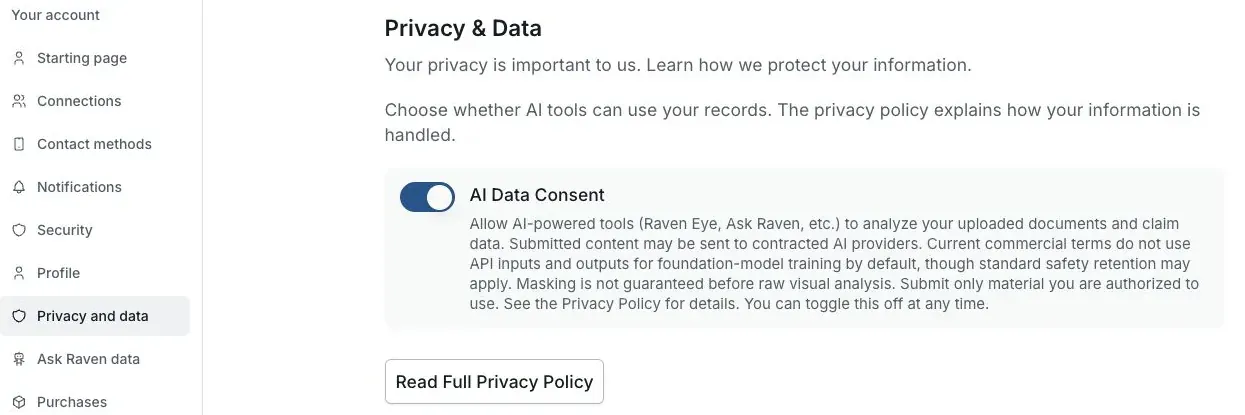
Actual Settings screen from the fictional account preview.
Choose what you want to change
Decide whether you need an export, a saved-item removal, a VA disconnect, an AI consent change or account deletion.
Open the relevant control
Use the feature’s saved-item controls for that record. For consent or connections, open Settings and read the current notice.
Check the scope
Read what the action will change. One deletion, consent choice or disconnect does not automatically perform the others.
Confirm the result
Wait for the saved status or completion confirmation. Use the account-deletion guidance when you want the verified support process.
If this does not work
The displayed state does not match what you expected
- Check the account, claim and selected record.
- Read the current source, date and status label.
Preserve the original record and any unsaved text. Describe the screen and message to support without sending private records.
Return to your preparation
Check the source and current state before continuing.
Useful links
Related articles
Was this helpful?
Still need help? Ask the team